Client Side Tracking vs Server Side Tracking: Which Is Better for Google Ads?
 PPC Marketing Editorial Team
October 26, 2026
10 min read
PPC Marketing Editorial Team
October 26, 2026
10 min read
Google Ads performance depends on more than clicks, impressions, and budget. To make informed bidding decisions, advertisers need reliable conversion data that shows which marketing activities generate valuable leads and sales.
However, browser restrictions, consent settings, ad blockers, and tracking configuration issues can create gaps in conversion measurement. This is why many businesses are comparing client side tracking vs server side tracking to improve their Google Ads tracking setup.
Both methods help businesses measure marketing activity, but they process and transmit data differently. Choosing the right approach can help improve measurement quality, manage data more effectively, and give Google Ads better signals for campaign optimization.
In this guide, we explain the differences between client side and server side tracking, their advantages and limitations, and how to choose the right solution for your business.
What Is Client Side Tracking?
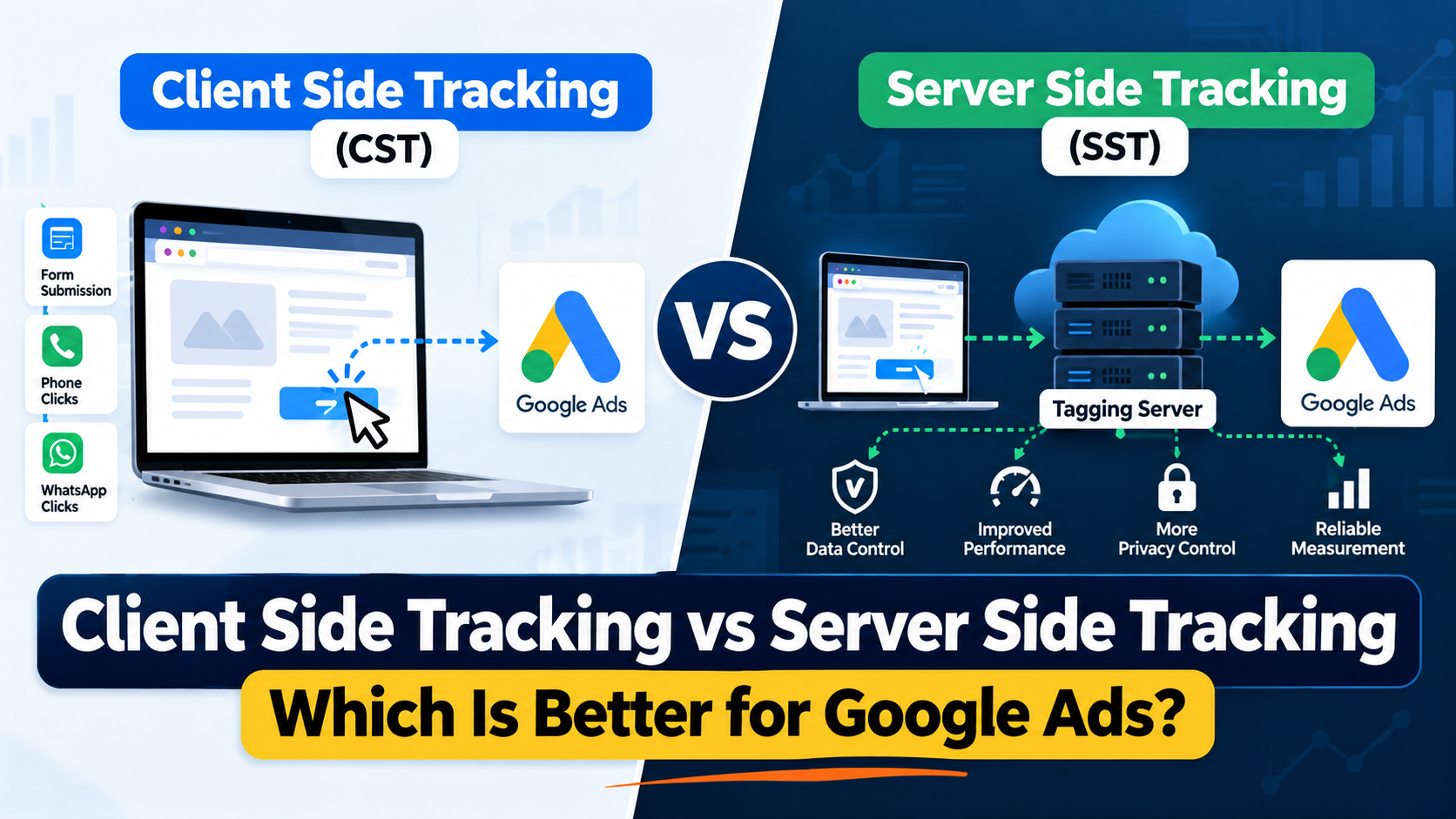
Client side tracking is a method of collecting website activity through the visitor's browser. When someone visits a website, interacts with a button, submits a form, or completes a purchase, tracking code running in the browser can send the relevant event data to platforms such as Google Ads and Google Analytics 4.
Google Tag Manager and the Google tag are commonly used to implement client side tracking.
How Client Side Tracking Works
A typical client side tracking setup follows these steps:
- A visitor clicks a Google Ads advertisement and lands on your website.
- The website loads the necessary tracking code.
- The visitor completes an action, such as submitting a contact form or clicking a phone number.
- A tracking event is triggered in the browser.
- The event data is sent to Google Ads or Google Analytics for measurement.
For example, a travel agency might configure Google Tag Manager to record a phone button click on its flights to Pakistan landing page. When a visitor clicks the button, Google Ads receives the conversion event if the tag fires successfully and the applicable settings allow it.
It is important to distinguish a button click from a completed phone call. A click indicates an interaction, but it does not confirm that the customer connected with an agent or made a booking. (Learn more about why poor landing pages lose potential customers despite high click volume).
Benefits of Client Side Tracking
- 1. Simple implementation: Client side tracking can usually be configured through Google Tag Manager or the Google tag without requiring a dedicated tagging server.
- 2. Lower initial cost: Businesses can implement many standard conversion events without paying for additional server infrastructure.
- 3. Direct interaction measurement: It is useful for measuring website actions such as form submissions, phone button clicks, WhatsApp clicks, booking enquiries, and checkout activity.
- 4. Easier testing and troubleshooting: Tools such as Google Tag Manager Preview and Tag Assistant help marketers verify whether tags fire when expected.
- 5. Suitable for many websites: Businesses with straightforward conversion requirements may find that a properly configured client side setup provides everything they need.
Limitations of Client Side Tracking
Client side tracking relies on browser execution. If JavaScript fails, a tracking request is blocked, or a browser restriction interferes with data collection, some events may not be recorded.
Other potential limitations include excessive tracking scripts, inconsistent event configurations, and duplicate conversion events.
These problems can affect reporting accuracy. However, not every missing conversion is caused by client side tracking, and not every client side implementation experiences significant data loss.
What Is Server Side Tracking?
Server side tracking processes measurement events through a server rather than relying exclusively on tracking tags running in the visitor's browser.
With Google Tag Manager server side tagging, a website can send event data to a server container that you manage. The server processes the incoming request and forwards appropriate information to Google Ads, Google Analytics, or other supported platforms.
You can learn more in Google's official guide to server side tagging.
How Server Side Tracking Works
A typical server side setup follows these steps:
- A visitor arrives on your website.
- The website records a relevant event, such as a form submission or completed booking.
- Event data is sent to your configured tagging server.
- The server processes the data according to your configuration.
- The server forwards the appropriate conversion information to Google Ads or another destination.
The original event may still be captured in the browser. Server side tracking changes how measurement data is processed and distributed; it does not automatically eliminate the need for browser based event collection.
For example, a travel agency could configure its website to send a successfully submitted enquiry to a tagging server. The server could validate the event parameters and forward the conversion data to Google Ads.
If the website also connects to a booking system or customer relationship management (CRM) platform, the business may be able to connect its advertising data with confirmed leads and completed bookings.
Benefits of Server Side Tracking
- 1. Greater control over data: A server side tagging setup gives businesses more control over which event parameters are processed and which information is forwarded to each marketing platform.
- 2. Potential website performance improvements: Moving supported tracking tags away from the browser can reduce the amount of third party measurement code running on the page. Google identifies improved website performance as one of the benefits of server side tagging. Actual performance improvements depend on the implementation and the scripts that are removed or retained.
- 3. Improved data governance: Businesses can apply rules to remove unnecessary information, validate incoming events, and manage how data is distributed between platforms.
- 4. Flexible integrations: Server side tracking can support more advanced measurement setups involving Google Ads, Google Analytics, CRM systems, and other marketing tools.
- 5. Additional control over measurement infrastructure: When configured appropriately, a server side setup can use a custom domain and support a first party measurement architecture. The results depend on browser behaviour, implementation details, and applicable privacy settings.
Limitations of Server Side Tracking
Server side tracking requires more technical knowledge than a basic browser based setup. Businesses may need a server container, hosting infrastructure, developer support, ongoing monitoring, and additional configuration.
There are also important limitations to understand:
- Server infrastructure can introduce ongoing costs.
- Incorrect event mapping can create inaccurate reporting.
- Duplicate events can inflate conversion counts if deduplication is not handled properly.
- Events that never reach the server cannot automatically be recovered.
- Server side tracking does not override browser restrictions, advertising platform policies, or consent requirements.
Therefore, server side tracking should be implemented to solve specific measurement problems rather than adopted simply because it is considered more advanced.
Client Side Tracking vs Server Side Tracking: Key Differences
The following comparison explains how the two approaches differ for Google Ads advertisers:
| Feature | Client Side Tracking | Server Side Tracking |
|---|---|---|
| Where tracking tags execute | Visitor's browser | Tagging server |
| Initial setup | Usually simpler | More technical |
| Infrastructure costs | Usually lower | Hosting and maintenance may cost extra |
| Website interaction measurement | Well suited to browser events | Often depends on events sent from the website or another source |
| Data processing control | Available through tag configuration | Additional control before data reaches destinations |
| Website performance | More tracking code may run in the browser | Can reduce browser workload |
| Integration flexibility | Suitable for standard implementations | Useful for more advanced data flows |
| Privacy management | Consent and tag controls are essential | Additional control over data forwarded to platforms |
| Maintenance | Usually less infrastructure maintenance | Requires server monitoring and configuration |
| Google Ads Smart Bidding | Supported | Supported when valid conversion data reaches Google Ads |
Google explains the technical differences and trade-offs in its server side tagging fundamentals guide.
Neither approach guarantees more conversions, lower advertising costs, or better return on ad spend. Those outcomes depend on conversion quality, campaign strategy, implementation quality, and the actual performance of the business.
Which Tracking Method Is Better for Google Ads?
The right solution depends on your website, business model, conversion volume, technical resources, and measurement objectives.
For many businesses, a combination of client side and server side tracking offers the most practical approach.
When Client Side Tracking Is the Better Choice
Client side tracking is often suitable when:
- You operate a small or medium sized website with straightforward tracking needs.
- You mainly measure form submissions and website interactions.
- Your existing Google Tag Manager setup is accurate and reliable.
- You want to keep technical complexity and infrastructure costs low.
- You do not have a CRM or booking system that needs advanced integration.
If your current setup records genuine leads accurately, moving to server side tracking may provide limited additional value until you identify a specific tracking or data management problem.
When Server Side Tracking Is Worth Considering
Server side tracking may be useful when:
- Your website uses many third party marketing and analytics tags.
- You need more control over the data sent to external platforms.
- Your business has complex conversion events or multiple marketing integrations.
- You need to connect website activity with CRM outcomes or booking data.
- You want to implement a more controlled measurement architecture.
- Your technical team can support the additional infrastructure and ongoing maintenance.
Before investing, identify the actual problem you are trying to solve. For example, determine whether the issue is browser based data loss, duplicate events, poor event quality, incorrect attribution, or the absence of qualified lead information. Different problems require different solutions.
How Tracking Quality Affects Google Ads Smart Bidding
Smart Bidding strategies, including Target CPA and Target ROAS, use conversion information and other available signals to optimize bidding. The usefulness of that optimization depends partly on the quality of the conversion actions you report.
Consider a travel agency advertising flights from the UK to Pakistan. A visitor clicks an advertisement, opens the website, clicks a WhatsApp button, and then leaves without sending an enquiry.
If the agency counts the WhatsApp click as a successful lead, Google Ads may optimize towards users who are more likely to click the button, rather than users who are more likely to make a booking. (Explore our guide on PPC reports full of clicks but no customers to see how this damages account efficiency).
Now imagine the agency tracks successfully submitted enquiries and imports qualified lead or booking outcomes from its CRM. This provides a more meaningful picture of the results generated by the campaign.
The important lesson is that better conversion signals matter more than simply recording a higher number of conversions.
For effective campaign optimization:
- Separate meaningful conversions from low value interactions.
- Record completed forms rather than relying only on button clicks.
- Track phone calls in a way that distinguishes clicks from connected calls where possible.
- Assign conversion values that reflect genuine business value when appropriate.
- Use qualified lead and booking data to improve measurement when your systems support it.
Server side tracking can support a better measurement architecture, but it does not automatically determine which leads are valuable.
Server Side Tracking vs Enhanced Conversions
These two concepts are related, but they are not the same.
Server side tracking describes how event data is processed and forwarded through a server.
Enhanced conversions is a Google Ads measurement feature that uses eligible first party customer data, such as email addresses, to improve conversion matching. The data is hashed before being sent in the supported implementations, subject to Google's requirements and the advertiser's consent obligations.
Enhanced conversions can complement an existing conversion tracking setup. Businesses using Google Tag Manager may be able to implement enhanced conversions without adopting a complete server side tagging architecture.
For lead generation businesses, Google's enhanced conversions for leads and offline conversion capabilities can also help connect website leads with outcomes recorded later in a CRM. Read Google's official guide to enhanced conversions for leads.
Do not assume that installing server side tracking automatically enables enhanced conversions. Each feature needs the appropriate configuration and validation.
Does Server Side Tracking Improve Google Ads Conversion Accuracy?
It can help in certain circumstances, but it is not a universal fix for inaccurate or missing conversions.
For example, server side tracking may improve control over how valid events are processed and forwarded. However, it cannot automatically recover a form submission that was never captured, identify a genuine booking without the relevant business data, or correct an incorrectly configured conversion action.
Audit Checklist Before Changing Tracking Infrastructure
Before investing in server infrastructure, review the following fundamentals:
- Whether the correct conversion events are firing.
- Whether duplicate tags or triggers are recording the same action more than once.
- Whether conversion values and transaction identifiers are being passed correctly.
- Whether consent settings and applicable privacy requirements are respected.
- Whether the conversions reported in Google Ads match the outcomes recorded in your website, booking system, or CRM.
If the main issue is that a form submission is incorrectly configured, fixing the event implementation may be more valuable than immediately moving to server side tracking.
Best Practices for Implementing Google Ads Tracking
Whether you choose client side tracking, server side tracking, or both, follow these proven practices:
1. Define Your Conversion Goals
Identify the business outcomes that matter. For a travel agency, these might include a qualified flight enquiry, a connected phone call, a confirmed holiday booking, or a completed transaction. Avoid treating every website interaction as an equally valuable conversion.
2. Audit Your Existing Google Tag Manager Setup
Review your tags, triggers, variables, and conversion actions. Use Tag Assistant and GTM Preview to check whether events fire under the intended conditions.
3. Avoid Duplicate Conversion Reporting
If the same event is sent through both browser and server routes, implement appropriate deduplication. For purchase events, consistent transaction identifiers can help identify duplicate transactions where supported. Also review which Google Ads conversion actions are included in the account's primary conversion goals.
4. Implement Consent Controls Correctly
Server side tracking does not replace consent management. Your implementation should respect the visitor's consent choices and communicate the appropriate consent signals to Google. Google's Consent Mode documentation explains how Google tags adjust their behaviour based on consent status.
5. Test Before Launching
Use testing and debugging tools to confirm that the correct events reach their intended destinations. Verify conversion values, event parameters, consent behaviour, and deduplication before relying on the data for campaign optimization.
6. Connect Offline Outcomes Where Appropriate
If your business receives leads by phone, WhatsApp, or enquiry forms and completes bookings later, consider integrating eligible CRM or offline conversion data with Google Ads. This can help connect advertising activity with business results beyond the initial website interaction.
7. Monitor Performance After Implementation
Compare tracking diagnostics, recorded conversions, lead quality, and actual business outcomes before and after making changes. Do not assume that a sudden increase in recorded conversions means the campaign is performing better. First establish whether the measurement has improved or the number of genuine leads has changed.
What Is the Best Tracking Setup for Small Businesses?
Small businesses do not always need a dedicated server side tracking implementation.
If your website has a limited number of conversion events, start with a well configured client side Google Tag Manager setup. Ensure the right conversion actions are recorded and that duplicate events are eliminated.
If your requirements become more advanced, evaluate server side tagging alongside other improvements, such as enhanced conversions, CRM integration, and offline conversion measurement.
The best approach is the one that balances measurement quality, technical complexity, cost, privacy requirements, and business objectives.
Final Verdict: Client Side or Server Side Tracking?
Client side tracking remains a practical and cost effective choice for many Google Ads campaigns. It is relatively straightforward to implement and works well for measuring standard website interactions.
Server side tracking provides additional control over data processing, routing, and measurement infrastructure. It can also reduce the amount of third party tracking code running in the browser, depending on the implementation.
For businesses that need more advanced measurement, a hybrid approach can combine browser based event collection with server side processing and, where appropriate, CRM or offline conversion data.
Ultimately, there is no single tracking method that is best for every business. Start by improving the accuracy of your existing tracking, identify any unresolved data gaps, and adopt server side tracking when it provides a clear operational or measurement benefit. Explore our performance marketing blog for additional deep dives into PPC strategy and lead optimization.
Improve Your Google Ads Conversion Tracking With PPCMarketing.com.pk
Are your Google Ads campaigns generating clicks but not enough qualified leads? Inaccurate conversion tracking may make it harder to understand which campaigns, keywords, and landing pages deliver genuine business value.
At PPCMarketing.com.pk, we help businesses improve their Google Ads measurement, conversion tracking, campaign structure, and performance analysis. From Google Tag Manager implementation to conversion tracking audits and PPC campaign optimization, the objective is to help you make informed decisions based on meaningful data.
Frequently Asked Questions
1. What is the difference between client side and server side tracking?
Client side tracking executes tracking code in the visitor's browser, while server side tracking processes measurement data through a server before sending it to advertising and analytics platforms.
2. Is server side tracking better than client side tracking for Google Ads?
Not in every situation. Server side tracking can offer more control over data processing and may reduce the tracking code running in the browser. Client side tracking is often simpler and sufficient for standard conversion measurement.
3. Does server side tracking improve Google Ads conversion tracking?
It can improve data processing and control when configured correctly. However, it does not automatically recover every missing conversion or fix incorrect events. The outcome depends on the implementation and the source of the tracking problem.
4. Can I use Google Tag Manager for server side tracking?
Yes. Google Tag Manager supports separate web and server containers. A typical setup uses a web container to collect and send event data and a server container to process and forward supported events.
5. Does server side tracking make my website faster?
It can help reduce the amount of third party tracking code running in the browser. The actual impact depends on the implementation, the tags moved to the server, and the other scripts still running on the website.
6. Is server side tracking expensive?
Costs vary depending on hosting, traffic volume, infrastructure requirements, setup complexity, and ongoing maintenance. A small website may not need a dedicated server side setup, while a business with complex tracking requirements may benefit from the additional investment.
7. Is server side tracking the same as enhanced conversions?
No. Server side tracking describes how measurement data is processed. Enhanced conversions is a Google Ads feature that uses eligible first party customer data to improve conversion matching. They can complement each other.
8. Can server side tracking bypass ad blockers or consent restrictions?
No. It may reduce some dependencies on browser based tracking, but it cannot guarantee that all blocked events will be recovered. It must also respect applicable privacy requirements, consent choices, and Google policies.
9. Which tracking method should a lead generation business choose?
Start with accurate client side conversion tracking. If you need better control over data processing or integration with a CRM, consider server side tracking and suitable offline conversion measurement options.